
80s Viral AI Photo Editing Prompts Free in 2026 (Copy-Paste)
The 80s Viral AI Photo Editing Prompt trend has become popular among people who love retro photos and neon portraits. You can turn a simple selfie into a neon night portrait or a VHS style throwback in a few seconds.
The good part is that you do not need Photoshop or a retro filter app for this. In most AI photo editors you just upload your photo and paste a prompt. Then you generate a few versions and pick the best one.
I have noticed that a small change in the prompt can change the whole mood of the picture. Asking for VHS grain instead of a simple retro tone gives a very different result. That is why choosing the right prompt matters more than the tool you use.
In this guide you will find ready-to-use 80s AI photo prompts. You will also get popular editing ideas and simple tips. Also try: ChatGPT Photo Edit Secret Code.
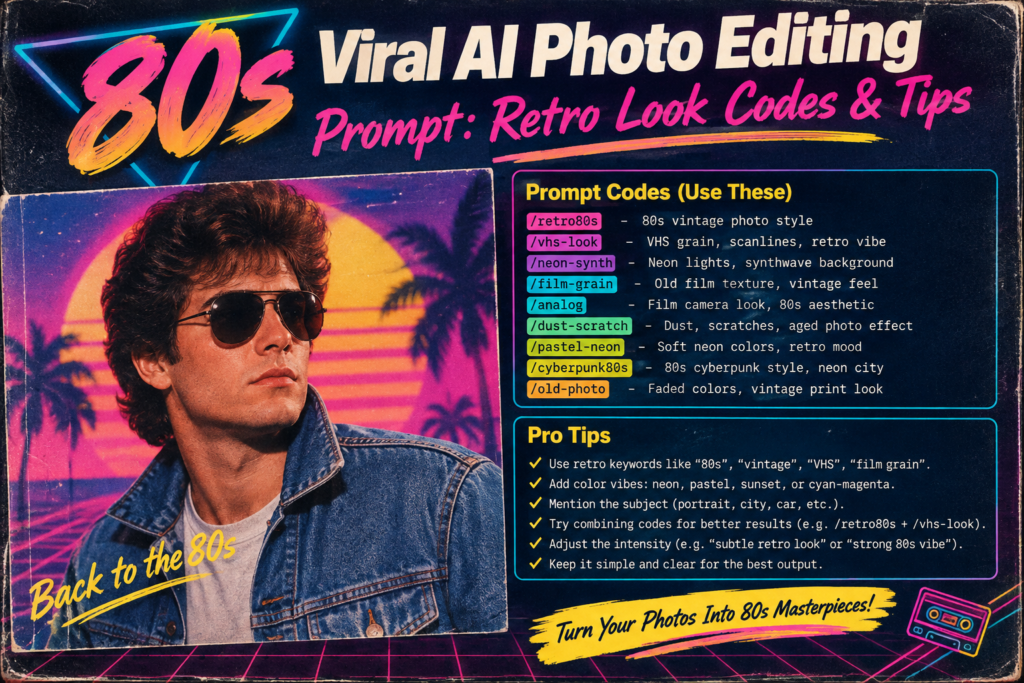
What Is the 80s Viral AI Photo Editing Prompt?
The 80s Viral AI Photo Editing Prompt is a text instruction that you give to an AI photo tool. It tells the tool to give your normal photo an 80s style look. The look can include neon light or big hair or film grain. It depends on the prompt you use.
Common styles in this trend are:
- Neon lights around the face
- Purple and pink sunset grid background
- VHS tape grain with soft distortion
- Big 80s hairstyle with bold makeup
- Denim and leather with retro sunglasses
- Faded film colour tone
Earlier this kind of look needed manual editing. Now an AI image tool can create a similar result from one clear description.
For example you can upload your portrait and write:
“Create a realistic 80s style portrait with neon purple lighting and soft film grain. Use a retro city background and keep the original face unchanged.”
The AI will follow your description and apply that style. Results change a little from tool to tool. So it helps to generate two or three versions.
Best 80s AI Photo Editing Prompts
Below are ready-to-use prompts for different 80s styles. You can copy any prompt directly. Then change small details like colour or outfit to match your own photo.
Retro Glam Port AI Prompt
Turn this photo into a glamorous 1980s studio portrait. Add bold blush and glossy lips with soft shimmer on the skin. Use warm studio lighting and a plain retro backdrop. Add gentle film grain and a warm colour tone. Keep the original face and skin texture unchanged.
Neon Synthwave Portrai AI Prompt
Create a retro synthwave portrait. Add a glowing purple and pink grid horizon in the background. Put soft neon light on the face from the side. Add light haze in the air with a dark night sky. Keep the original face and natural features unchanged.
VHS Tape Throwback AI Prompt
Edit this photo to look like a frame from an old 1980s home video. Add visible VHS grain with soft tape lines. Use warm faded colours and add a small date stamp in the corner. Keep the face natural and unchanged.
80s Film Camera Photo AI Prompt
Give this photo a classic 1980s film camera look. Use warm colours with soft contrast and natural grain. Add a light flash effect on the face. Make it look like a candid indoor picture. Preserve the original face and features.
Polaroid Retro Photo AI Prompt
Create a retro polaroid style photo with a white instant photo border. Use slightly faded colours with soft focus. Add warm indoor lighting and light grain. Keep the pose natural and the original face unchanged.
80s Denim Jacket Look AI Prompt
Change the outfit to a classic 1980s denim jacket with a plain t-shirt underneath. Add retro sunglasses. Use soft daylight with a simple street background. Apply a warm vintage colour tone. Keep the face and body shape unchanged.
80s Album Cover Photo AI Prompt
Turn this photo into a vintage 1980s music album cover. Use a warm sunset colour tone with a neon glow around the subject. Leave empty space at the top for bold retro text. Add soft grain texture. Keep the pose relaxed and the original face unchanged.
How to Use the 80s AI Photo Editing Prompt
Open ChatGPT, Gemini, or any AI photo editing tool on your phone or browser.- Sign up or log in if you do not already have an account.
- Upload a clear photo where your face and outfit are visible.
- Type the 80s style prompt you want to try, such as /80svibe or /synthwave.
- Send the message and wait for the AI to generate the new photo.
- Check the face, hair, and background carefully before you save or post it.
- If something looks off, add a short instruction instead of starting the whole prompt over.
Best 80s Viral AI Photo Editing Prompts by Category
Below are the most popular 80s style prompts, grouped by look. You can copy any of these directly and use them on your photo.
Retro Glam Codes
- /80sglam – Bold makeup and glossy retro glow
- /bighairstyle – Voluminous 80s hairstyle
- /promlook80s – Retro prom night styling
- /discoglam – Shiny, disco inspired finish
- /retroportrait – Classic 80s studio portrait look
Neon and Synthwave Codes
- /synthwave – Neon grid and purple pink sky
- /neoncity – Glowing neon city background
- /retrofuture – Futuristic 80s inspired design
- /laserlight – Bright laser style light beams
- /vaporwave – Pastel neon retro aesthetic
Film and VHS Codes
- /vhsgrain – Old video tape texture and grain
- /filmphoto80s – Classic 80s film camera look
- /polaroidstyle – Retro polaroid photo finish
- /analogfilm – Warm analog film color tone
- /tvstatic – Retro television static effect
Fashion and Outfit Codes
- /denimjacket80s – Classic 80s denim jacket style
- /trackjacket – Retro sporty track jacket look
- /leatherjacket80s – Bold retro leather jacket style
- /highwaistjeans – Retro high waisted jeans styling
- /retroshades – Classic 80s sunglasses look
Music and Poster Codes
- /albumcover80s – Retro music album cover style
- /concertposter – Vintage concert poster design
- /boomboxvibe – Retro boombox and street style
- /arcadeneon – Retro arcade neon background
- /cassettetheme – Cassette tape inspired design
Background and Color Grade Codes
- /sunsetgrid80s – Retro sunset with grid horizon
- /purplepinkglow – Warm purple and pink color tone
- /retrocolorgrade – Faded retro color correction
- /miamivice – Pastel teal and pink beach tone
- /oldschoolfilter – Soft retro filter finish
How to Combine Multiple 80s Photo Prompts
You do not need to stick to just one code. Combining two or three of these prompts together usually gives a much richer result.
Retro portrait: /retroportrait /80sglam /retrocolorgrade
Synthwave poster: /synthwave /neoncity /albumcover80s
VHS throwback: /vhsgrain /analogfilm /retroshades
A good rule to remember is to keep it simple. Stacking four or five codes together at once can make the photo look too busy and can change your face more than you expect. Two or three codes at a time usually gives a cleaner, more natural result.
How to Write a Better 80s AI Photo Prompt
You do not need long or complicated sentences to get a good 80s style result. You just need to describe what you want clearly.
A simple formula that works well is:
Subject + Code + Lighting + Background + What to Keep Unchanged
For example:
“Portrait of me, /synthwave, neon purple lighting, retro grid background, keep my exact face and skin tone unchanged.”
One tip that makes a big difference is always mentioning that your face and natural features should stay the same. This is the part people often skip, and it is usually the main reason an edited 80s photo stops looking like the original person.
Popular 80s Viral AI Photo Editing Ideas
If you are not sure where to start, these combinations work well for common situations.
Viral Instagram Post: Try /80sglam with /retrocolorgrade for a warm, nostalgic feed photo.
Music Themed Post: Use /albumcover80s with /synthwave for a bold cover style shot.
Throwback Story: /vhsgrain with /analogfilm gives an authentic old tape look.
Retro Couple or Friends Photo: /discoglam or /promlook80s works well for group shots.
Aesthetic Profile Picture: /neoncity with /retroshades gives a cool, moody look.
Tips for Better 80s AI Photo Editing Results
AI can create an impressive retro look, but it can also feel too artificial if you are not careful. These simple tips help keep it natural.
- Start with a clear, well lit original photo.
- Keep your prompt focused instead of listing too many ideas together.
- Always ask the AI to keep your face and natural features unchanged.
- Match the color tone of the background to your original lighting.
- Avoid stacking more than two or three codes together.
- Generate a couple of versions before choosing your final photo.
Why Your 80s Photo Prompt Might Not Work
Face looks different: Your original photo may be small, angled, or heavily filtered. Use a clear front facing photo instead.- Retro style not strong enough: Add one extra detail, like “stronger film grain” or “brighter neon,” to guide the AI.
- Background looks odd: Try describing the background separately from the outfit or lighting codes.
- Photo looks overprocessed: You are probably using too many codes together. Reduce it to one or two.
- Text on posters looks wrong: AI still struggles with small text, so keep any text short and simple.
Is Using the 80s Viral AI Photo Editing Prompt Safe?
Yes, using short style prompts like this is a normal way of using an AI photo tool and does not go against standard usage policies. What you should avoid is uploading someone else’s photo without their permission, or creating anything misleading. Stick to your own photos, or photos you clearly have permission to edit.
Final Thoughts
The 80s Viral AI Photo Editing Prompt trend is a fun and easy way to give an everyday photo a completely different, nostalgic feel. Whether you want a neon synthwave poster, a VHS style throwback, or a simple retro glam portrait, these short prompts give you an easy starting point.
The key is to begin with a good quality photo, use one or two codes at a time, and always mention that your face should stay unchanged. If the first result does not look right, do not worry, just try a different code combination and generate again.
With the prompts and tips shared above, you can build your own set of favorite 80s style codes for Instagram posts, music themed pictures, or just for fun.
Frequently Asked Questions

Hi, I’m Vikram Ashwin, a technology writer who enjoys covering useful apps, digital tools, photo editing trends, and the latest tech topics. My goal is to share clear information, useful tips, and straightforward explanations without unnecessary technical language.